
After you've installed a new LEJIS certificate on your Informant server (see How to get and install a LEJIS certificate), you'll need to link it to Informant's LEJIS Interface on the same server.
Note: If you haven't already, install the LEJIS Interface server role on the Informant server machine. Refer to the LEJIS user guide in the Informant Help Center for details.
To do this:
- Click the Windows Start menu and type "Informant Configuration Manager," then click Informant Configuration Manager when it appears.
- If prompted to make changes to your device, click Yes.
- In the Informant Configuration Manager, click Server Roles in the sidebar.
- Click Configure to the right of LEJIS Interface.
- Important! On the General tab, make sure LEJIS Connection Type is set to "LEJIS Production Server (Harrisburg)."
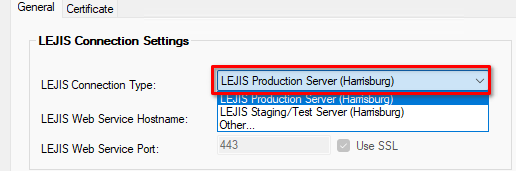
- Next, click the Certificate tab and click Load LEJIS Certificate....
- Select your LEJIS certificate (if you see more than one certificate option, select the certificate that shows your agency's ORI number). Click OK.
- Click OK to save the changes.